Shell Runner
Shell Runner is a utility designed to help design and test batch files and command scripts. It displays the output of the command in a window, optionally with a time stamp, clearly marking error output in red. A combined output/error log and/or separate output and error logs can be save automatically.
When started without arguments, Shell Runner displays its usage:
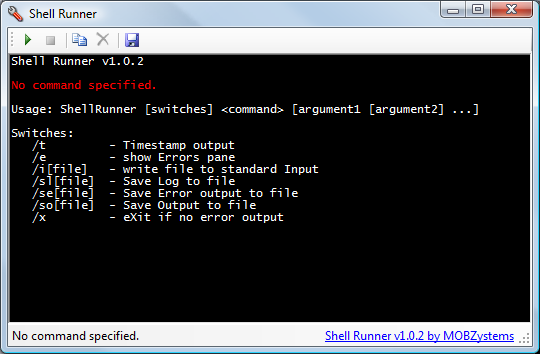
Shell Runner command line switches
Basically, you need to supply a command, plus optional arguments for it. The first switches on the command line can be:
| Switch |
Meaning |
Example |
| /t |
Timestamp. Show a the current date and time at the start of each line of output |
|
| /e |
Show Errors pane. Show the error output of the command in a separate pane below the normal output as well. |
|
| /i |
Write file to input. Write the contents of the specified file to the input stream of the command. |
/i:input.txt |
| /sl |
Save Log to file |
/sl:log.txt |
| /se |
Save Error log to file |
/se:errors.txt |
| /so |
Save Output to file |
/so:output.txt |
| /x |
Exit if no error output. Exit Shell Runner when the command finishes without producing any error output, otherwise keep Shell Runner open. |
|
Once Shell Runner is installed, right-clicking on a file with the extension .cmd, .bat or .exe will show a new menu item Run with Shell Runner. Clicking this item will start the batch file or executable file using Shell Runner.
Run with Shell Runner menu item
Shell Runner now runs on 64-bit Windows
A 64-bit problem in ConsoleProcess prevented Shell Runner from running on 64-bit Windows. Version 1.0.4 fixes that, and can be used to run both 32-bit and 64-bit processes on 64-bit systems (although Shell Runner itself continues to be a 32-bit application).
Download Shell Runner
Happy with this tool? Consider buying us a cup of coffee