RegName
RegName is a regular expression based tool to perform complex file rename operations. It shows a list of files in a folder matching a selectable pattern. It then allows you to rename those files to another pattern, including preview.
RegName has many handy uses: renaming image files, log files, music files, etc.
Once installed, RegName shows up on the start menu. When started from there, it will display the contents of your My Documents folder. You can then browse to the folder of your choice. However, it is much quicker to just right-click on a folder and select Rename files using RegName...:
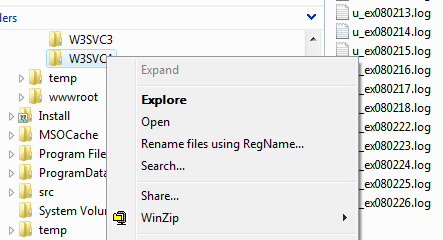
The RegName folder context menu
RegName will then start up in the folder you selected:
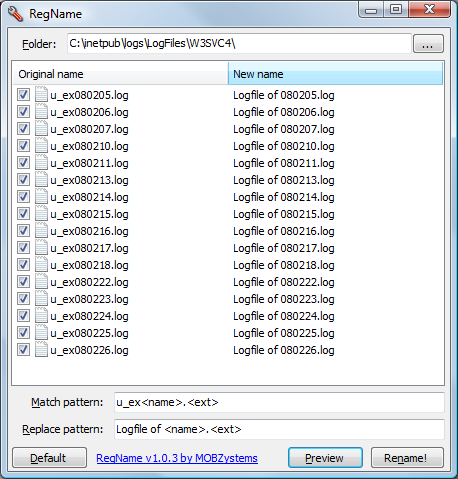
RegName Main Screen
RegName is very simple to use:
- Enter a match pattern that specifies which files you would like to rename. Use angle brackets (< and >) to split up the file names into named parts. The default pattern is <name>.<ext>, which matches all files with an period in their name. The part before the period is called 'name', the part after it 'ext'.
- Then enter a replace pattern. Here, you can re-use the parts defined in the match pattern, so if you would enter <name>, the file extension would be removed; if you entered <name>.<ext>.<ext>, the extension would be duplicated. The possibilities are endless.
- Click Preview to show only the files matching your match pattern, and to display their new name on the right. If a file would does not change its name using the supplied patterns, it remains unselected. All other files will have a checkmark in front of them
- When you're satisfied with the results, click Rename! to perform the rename operation on all selected files.
- If you want to restore the standard match and replace patterns, click Default.
- To start a new rename operation in another folder, click the ...-button at the top right.
For some more complex operations, that is not quite enough. Suppose we wanted to rename files called 'ex080224.log' into '24-02-2008.log'? Then the real power of RegName kicks in: the parts a file name are made up of can be specfied as real regular expressions. Simply add the expression after the name of the part in the match pattern, with a colon in between. In this case we would enter:
ex<y:\d\d><m:\d\d><d:\d\d>.log
That means: first the letters e and x, then two digits (the combination \d stands for a digit) in a part called 'y' (for 'year'), two digits in a part called 'm', and another two digits in a part called 'd'.
The replace pattern would be:
<d>-<m>-20<y>.log
Below is an example of the advanced use of match patterns:
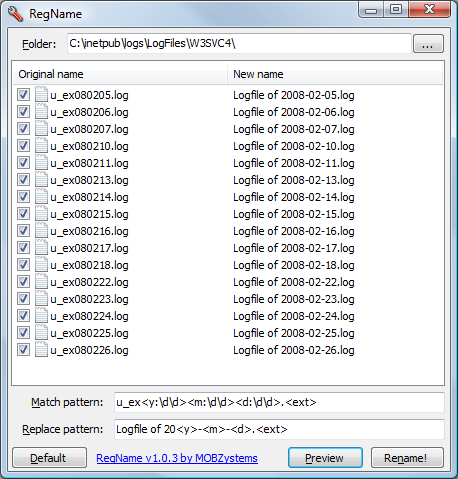
Advanced Match Pattern
But that's not all. RegName has a companion tool that runs as a console application, allowing you to achieve the same results from the command line. The command line version of RegName is called RegName.exe and is installed into the same location as the main application. For more information, start RegName.exe in a command prompt using:
C:\Program Files\MOBZystems\RegName>RegName /?
Enter: PowerShell!
[A few years pass]
Here's a PowerShell script that does a lot of what RegName does in two screens of code. Basically, it uses Get-ChildItem to enumerate files and/or directories from a path, optionally recursively, and match the names of the items found against a regular expression. It then constructs a new name (also with a regular expression) and uses Rename-Item to set the new name. The rest of the code is comments, parameter declaration and error handling! I called it RegexRename-Item. Download, save to a file called RegexRename-Item.ps1 somewhere and run from there.
<#
.Synopsis
   Rename items using regular expressions
.DESCRIPTION
   Rename a series of items using regular expressions for matching and replacing item names

   By default, matching takes place on the entire item name. To match a name partially,
   use the -PartialMatch switch
.EXAMPLE
   RegexRename-Item '[abc]{1,3}\.txt' '$0-test'

   Matches items in the current directory (.) against the regular expression pattern
   [abc]{1,3}\.txt, i.e. 1 to 3 letters, each a, b, or c, with an extension of .txt.
   The name of the item is changed to the previous name ($0, the entire match) with "-test" after it
.EXAMPLE
   To use parts of the original name in the replacement, enclose parts of the filter in parentheses:

   RegexRename-Item '([abc]{1,3})\.(txt)' '$1-test.$2'

   This matches the three letters as $1 and the extension 'txt' in $2. The replacement pattern
   '$1-test.$2' will add '-test' BEFORE the extension
.NOTES
   Because regular expressions often contain dollar ($) characters, both -Match and -Replace
   patterns should be enclosed in single quotes. Also, the '.' character must be escaped as '\.'!
#>
[CmdletBinding(
    SupportsShouldProcess=$true,
    ConfirmImpact="High"
)]
Param
(
    # The regular expression to search for
    [Parameter(
        Mandatory=$true,
        Position=0
    )]
    [string]
    $Match,

    # The replacement regular expression, e.g. $1-$2
    [Parameter(
        Mandatory=$true,
        Position=1
    )]
    [string]
    $Replace,

    # The path to operate on
    [Parameter(
        Mandatory=$false,
        Position=2
    )]
    [string]
    $Path = '.',

    # Match partial item names. Default is: entire name
    [Parameter(Mandatory=$false)]
    [switch]
    $PartialMatch,

    # Pass the renamed items down the pipeline
    [Parameter(Mandatory=$false)]
    [switch]
    $PassThru,

    # Supress count of renamed items at end and don't warn if count equals 0
    # Count is never shown when using -PassThru!
    [Parameter(Mandatory=$false)]
    [switch]
    $NoCount,

    # Match files only
    [Parameter(Mandatory=$false)]
    [switch]
    $File,

    # Match directories only
    [Parameter(Mandatory=$false)]
    [switch]
    $Directory,

    # Operate on subdirectories too
    [Parameter(Mandatory=$false)]
    [switch]
    $Recurse,

    # Operate on hidden items too
    [Parameter(Mandatory=$false)]
    [switch]
    $Force
)

Begin
{
    # Pick up the value of the $Verbose switch
    [boolean]$Verbose = ($PSCmdlet.MyInvocation.BoundParameters["Verbose"] -eq $true)
    Write-Debug "Verbose = $Verbose"

    # Surround pattern with ^ and $ if not partially matching
    if ($PartialMatch -eq $false) {
        $Match = "^$Match`$"
        [string]$MatchType = "COMPLETELY"
    } else {
        [string]$MatchType = "PARTIALLY"
    }
    [string]$RecurseType = ""
    if ($Recurse) {
        $RecurseType = " and below"
    }
    Write-Verbose "Renaming items in `"$Path`"$RecurseType $MatchType matching `"$Match`" with `"$Replace`""

    # Test the match pattern
    Try {
        "" -match $Match | Out-Null
    }
    Catch {
        Write-Error "Invalid match pattern ""$Match"": $_" -ErrorAction Stop
    }

    # Test the replace pattern
    Try {
        "" -replace $Match,$Replace | Out-Null
    }
    Catch {
        Write-Error "Invalid replacement pattern ""$Replace"": $_" -ErrorAction Stop
    }

    [int]$Count = 0
}
Process
{
    # Enumerate children from $Path
    # Filter on name
    # ForEach resulting file: determine new name and rename
    Get-ChildItem $Path -Directory:$Directory -File:$File -Recurse:$Recurse -Force:$Force |
    Where { $_.Name -match $Match } |
    ForEach-Object {
        [string]$NewName = $_.Name -replace $Match,$Replace
        Rename-Item -Verbose:$Verbose $_.FullName $NewName -PassThru:$PassThru
        $Count++
    }
}
End
{
    # Unless NoCount = true, we display the count of items renamed
    if ($NoCount -eq $false) {
        # Report an error if no items found
        if ($Count -eq 0) {
            Write-Error "No items found matching `"$Match`"!"
        } elseif ($PassThru -eq $false) {
            # Report the count, unless we have $PassThru
            Write-Output "$Count Item(s) renamed."
        }
    }
}
Download RegName
Happy with this tool? Consider buying us a cup of coffee