MOBZync
MOBZync displays two folder and their contents side-by-side and shows you the differences between them at a glance. Files that exist in one folder, but not in the other, are marked Added (purple). Files that exist in both folders are Unchanged (black) or else either Newer (green) or Older (red).

The MOBZync main screen
The buttons at the top can be used to show or hide files with a certain status. The buttons on the right allow you to start copying files from 'left to right', 'right to left' or to Synchronize the two folders by copying the necessary files in both directions.
Before copying, you can choose what you want MOBZync to do in more detail:
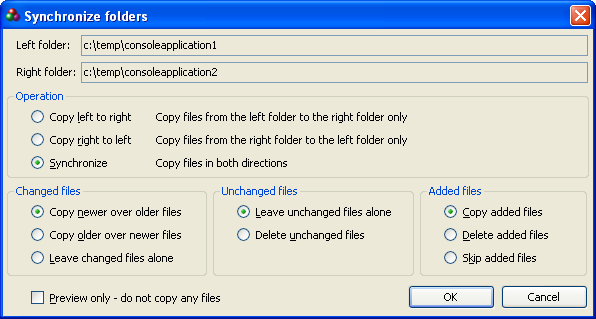
The MOBZync synchronization options screen
Command line
Starting MOBZync with one or two arguments will open those folders and then show the main screen:
MOBZync somefolder\folder drive:anotherfolder
MOBZync is in beta, so keep us posted when you have anything to report! In the mean time: if you'd like to contribute, check out MOBZync on GitHub. Contributions wanted!
Reviews
Tech Heavy, Omicrono (Spanish), Navigaweb (Italian), Geekissimo (Italian), Addictive Tips
Download MOBZync
Happy with this tool? Consider buying us a cup of coffee