QuickCode.NET 2010
DISCONTINUED!
QuickCode.NET was intended for Visual Studio 2010, updated to work with Visual Studio 2012 and 2013, but has been discontinued since. It will *NOT* work with Visual Studio 2015 and higher!
New to QuickCode.NET? Start here!
QuickCode.NET has been revamped!
The successor to QuickCode 2008 now works in Visual Studio 2005, 2008, 2010, and (with instructions) 2012 and 2013, has a new setup procedure, and a new user interface. In all other respects it's completely compatible with QuickCode.NET 2005. But perhaps the most striking change: QuickCode.NET 2010 is now free. No strings attached. Guaranteed.
What's new?
- A completely new user interface
- A new installation procedure that supports Windows Vista
- Support for Visual Studio 2010 and 2012 (with continued support for VS 2008 and 2005)
- Improved ease of use: QuickCodes are now expanded when the Tab key is pressed
- 'Create QuickCode from selection...', which puts the selected text in a replacement for the current language
What's been dropped?
- Support for Visual Studio 2002 and 2003
- The QuickCode Forum (which wasn't being used a lot, anyway)
- The ability to import QuickCodes (since the main source of imports was the QuickCode Forum)
What's still there?
Online help
QuickcCode.NET's help is now entirely online.
A new user interface
QuickCode.NET now has a completely new interface that integrates with Visual Studio. QuickCode.NET shows itself in a tool window, in this case docked with the Solution Explorer:
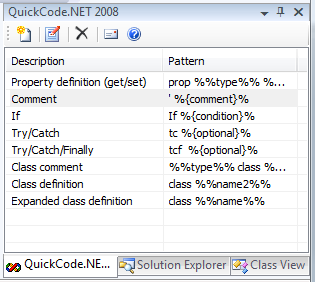
The QuickCode.NET Tool Window
Just Press Tab™
In QuickCode.NET 2010, there is no need for a hotkey anymore. Just type your QuickCode, then simply press Tab.
Older versions
If you are a registered QuickCode.NET user, you can still download QuickCode.NET 2003 (for Visual Studio 2002 and 2003, .NET framework 1.1) and QuickCode.NET 2005 (for Visual Studio 2005, .NET Framework 2.0).
Visual Studio 2012/2013
QuickCode.NET 2010 works under Visual Studio 2012 and 2013, but you'll have to follow these instructions to get it to work.
Version history
View QuickCode.NET version history
Download QuickCode.NET 2010
Happy with this tool? Consider buying us a cup of coffee